
iPhone · iPad
MU Online on your iPhone
The full game on the phone in your pocket. No App Store, no install: open the site, turn the phone sideways and play.
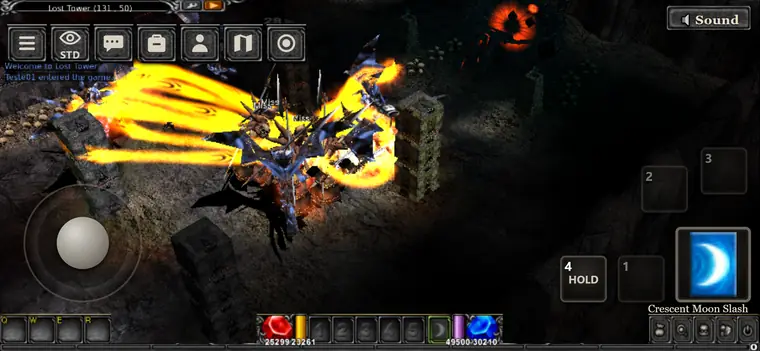
MU Insta runs in Safari and Chrome on iPhone and iPad with iOS 26 or newer. It is the same game as on the PC, with controls made for touch: tap to walk and attack, press and hold for a right click, and a keyboard button when you need to type.
Your hero is saved on the server, so you can level up on the computer at home and keep going on the phone wherever you are.
Touch controls
Tap to move and attack, hold for a right click, and a keyboard button appears when you need to type.
No App Store
Nothing to install from the store: the game opens in the browser you already use.
PC and phone, one hero
Same account and same character on every device.
Light on storage
About 60 MB of game data on the first start, kept by the browser.
- 01
Open muinsta.com on the iPhone
In Safari or Chrome, iOS 26 or newer.
- 02
Create your account or log in
The same account you use on the PC.
- 03
Turn the phone sideways
Landscape gives you the whole screen for the fight. Use Wi-Fi for the first start.
Your hero is one click away
Free account, no download. Start on the PC, carry on from the iPhone.
Questions
01Which iPhones and iPads work?
Devices with iOS or iPadOS 26 or newer, in Safari or Chrome.
02Do I need to download an app?
No. The game runs in the browser. There is nothing to install from the App Store.
03Can I play the same character on the PC?
Yes. Characters live on the server: log in on any device and it is the same hero.
04How do the controls work?
Tap to walk and attack, press and hold for a right click. A keyboard button appears for chat and login.
05Does it use a lot of data?
The first start downloads about 60 MB, so use Wi-Fi. After that the browser keeps the files and the game uses little data.